
eLearning Content Development: The Ultimate FAQ Guide
The demand for online learning is at an all-time high. Whether you are a corporate trainer, an ed-entrepreneur, or an educator, understanding eLearning content development is essential for transferring knowledge effectively.
To help you navigate this landscape, we have compiled the most frequently asked questions about creating digital learning experiences, including how modern AI-powered e-learning authoring platforms like Mini Course Generator can streamline the process.
Table of Contents
- What is eLearning content development?
- How to create eLearning content?
- What is a learning content developer?
- What are the 5 parts of e-content?
- What are custom eLearning solutions?
- What is Interactivity in eLearning?
- How can I personalize LMS content?
- What are eLearning authoring tools?
- Microlearning vs. Long-form: Which is better?
- How do I ensure content is engaging?
- How do I design effective content?
- How do I ensure content quality?
- How do I choose the right strategy?
What is eLearning content development?
eLearning content development is the end-to-end process of conceptualizing, structuring, creating, and publishing educational material for digital delivery.
Unlike traditional textbook creation, this process combines >instructional design principles with multimedia elements (text, audio, video, graphics) to create an experience that can be accessed via computers, tablets, or smartphones. It bridges the gap between raw information and a learnable, digital experience.

How to create eLearning content?
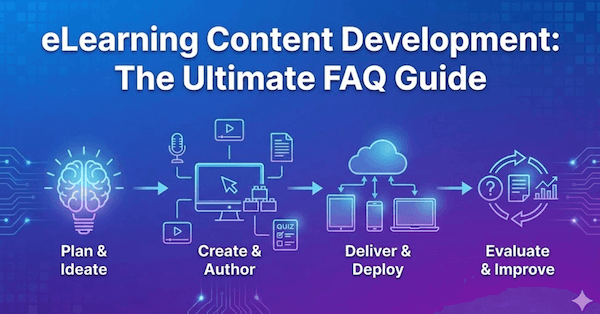
Creating eLearning content generally follows a structured workflow, often referred to as the ADDIE model (Analysis, Design, Development, Implementation, Evaluation). However, modern tools have simplified this significantly:
- Define the Goal: What should the learner be able to do after the course?
- Draft the Content: Outline your modules and lessons.
- Select an Authoring Tool: Choose software to build the course.
- Add Media & Interactivity: Insert images, videos, and quizzes.
- Publish: Export for web or LMS (Learning Management System)
A Faster Way: With Mini Course Generator, you don’t have to start from scratch. You can utilize the AI Course Creator to generate a comprehensive course outline and complete content based on a simple description of your topic. This allows you to jump straight to the refining and editing phase, saving hours of development time.
If you want to check how AI Course Creator works, you can see the details in this page.

What is a learning content developer?
A learning content developer (often overlapping with an Instructional Designer) is the professional responsible for building the actual course assets.
They are part educator and part technologist. Their role involves:
- Writing scripts and course text.
- Designing visual layouts.
- Developing interactive elements (quizzes, games).
- Ensuring the content works technically across different devices.
When it comes to creating content through elearning authoring tools, drag & drop block editors bring a superior convenience. To check the best platforms in this category, you can visit Articulate’s Rise, Mini Course Generator, and Easygenerator.

What are the 5 parts of e-content?
To create a holistic learning experience, effective e-content usually consists of five core components:
- Text: The foundational information and narrative.
- Images/Graphics: Visual aids, charts, and infographics to explain complex concepts.
- Audio/Video: Narrations, podcasts, or instructional videos for engagement.
- Animation: Motion graphics to demonstrate processes or capture attention.
- Simulation/Interactivity: Quizzes, image hotspots, flashcards, drag-and-drop activities, and scenarios requiring learner input.

What are custom eLearning solutions?
Custom eLearning solutions refer to training materials built specifically for an organization's unique needs, branding, and learning objectives, rather than buying generic "off-the-shelf" courses.
Custom solutions are ideal when you need to teach proprietary software, company-specific compliance, or niche topics.
How Mini Course Generator fits: You don't always need an expensive agency for custom solutions. Mini Course Generator allows for complete customization, letting you upload your own logos, choose brand colors, and craft specific learning pathways that reflect your organization's unique identity without the high price tag.

What is Interactivity in eLearning content development?
Interactivity is the element of eLearning that requires the learner to take action. It moves the learner from a passive observer (reading/watching) to an active participant.
Interactivity includes:
- Answering quiz questions.
- Clicking through flashcards.
- Making choices in branching scenarios.
- Completing surveys.
High interactivity leads to higher retention rates. Mini Course Generator specializes in this by offering a card-based structure where learners interact with bite-sized content, flip cards, and answer questions to proceed, keeping engagement high throughout the journey. Moreover, it offers the first of its kind feature, AI Interaction Builder, which turns into interactive elements relevant to the context it is in.
How can I customize LMS content?
Personalizing content within a Learning Management System (LMS) ensures learners feel the training is relevant to them. You can personalize content by:
- Pre-assessments: Allowing learners to "test out" of topics they already know.
- Branching: Directing learners to different content based on their role or quiz results.
- Modular Design: Breaking courses into small chunks so learners can choose what they need.
Pro Tip: If you use Mini Course Generator, you can create highly focused micro-courses and export them as SCORM packages. These packages plug directly into your LMS, allowing you to track individual progress while delivering a modern, personalized interface.

What are eLearning authoring tools?
eLearning authoring tools are software applications used to create digital training content. They arrange media, text, and interactions into a deliverable format.
They generally fall into two categories:
- Desktop-based: Heavy software installed on a PC (powerful but complex).
- Cloud-based: Accessible via a browser (collaborative and agile).
Mini Course Generator is a prime example of a cloud-based authoring tool. It prioritizes speed and ease of use, removing the steep learning curve associated with legacy software. It allows subject matter experts to become authors instantly.
Microlearning vs. Long-form: Which Is Better?
This debate often depends on the goal, but modern trends lean heavily toward microlearning.
- For Organizations: Microlearning is better because it is faster to produce and easier to update.
- For Learners: Microlearning is preferred because it fits into busy schedules and reduces cognitive load.
A strategy that respects the learner's time is always "better." Tools that facilitate micro-learning (short, focused bursts of learning) generally yield higher satisfaction and completion rates than hour-long, static lectures.
How do I ensure my eLearning content is engaging and effective?
To ensure engagement, you must compete for the learner's attention.
- Keep it short: Diverse attention spans require brevity.
- Use visuals: Break up walls of text.
- Tell stories: Frame the learning within a relatable context.
- Provide immediate feedback: Let learners know how they are doing instantly.
Using an authoring solution like Mini Course Generator inherently boosts engagement because it utilizes a card-like page layout. This format mimics the way we consume social media content—fast, visual, and interactive—preventing "click-next" fatigue.
How do I design effective eLearning content?
Designing effective content starts with solid Instructional Design (ID) principles:
- Align with Objectives: Ensure every slide or card serves a learning goal.
- Chunking: Break information into small, digestible pieces.
- Active Learning: Don't just lecture; ask questions.
- Accessibility: Ensure text is readable and videos have captions.

How do I ensure the quality of my eLearning content?
Quality assurance (QA) in eLearning involves three distinct checks:
- Content Accuracy: Is the information correct? (Subject Matter Expert review).
- Functional Testing: Do all buttons, links, and videos work? Does it work on mobile?
- Instructional Quality: Is the language clear? Is the flow logical?
Note: Mini Course Generator courses are mobile-responsive by default. This eliminates a massive chunk of QA testing, as you don't need to worry about how the content will break on different screen sizes.
How do I choose the right eLearning content development strategy?
Your strategy depends on your resources (time, budget, team) and your audience.
- Low Budget / Tight Deadline: Use AI-powered, rapid authoring tools (like Mini Course Generator) to build valid, effective content quickly.
- High Budget / Complex Simulation: You may need a team of developers and high-end software for VR or complex gamification.
For 90% of corporate training and educational needs, a rapid, agile strategy is most effective.
Are You Ready to Create Your eLearning Course?
The barrier to entry for creating professional eLearning content has never been lower. You no longer need coding skills or months of development time.
If you are ready to turn your expertise into engaging digital content, Mini Course Generator offers the fastest route from idea to live course.
- AI-Assisted Creation: Generate content in seconds.
- Interactive Cards: Engage learners instantly.
- Seamless Sharing: Share via link, embed on your site, or export to SCORM/PDF.
Sign up free and check how AI can increase your productivity during eLearning content development and experience the future of educational material preparation.

